|
Using ScrapOver Twist Templates
with Adobe® Photoshop® Elements
(Adobe® Photoshop® would follow similar instructions)
|
What are ScrapOver Twist™ Templates?
A ScrapOver Twist Template is a tool to make
your digital scrapping quicker and easier, while allowing you to focus
on being creative.
Consisting only of black lines and shapes
that you can use to insert your stash of digital papers and
embellishments, ScrapOver Twists can be addictive and are totally
re-useable! Think of them as a stained glass pattern and you are filling
in between the leading lines. By using different Page or Paper Pak
collections, or our themed CDs, you can achieve totally new looks!
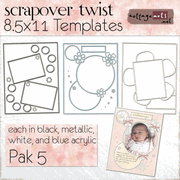
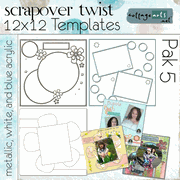
At right are some of our ScrapOver Twist
Paks, available in our on-line shop.
|
 
  |
How do I use ScrapOver Twist
Templates?
Using the templates with your image editor is fairly easy to learn
for those familiar with basic image editing functions. To begin,
check to see if your image editor has a selection tool, such as
Photoshop/Photoshop Elements' Magic Wand Tool, as well as a Paste Into
function (under Edit menu).
Open your image editor (we are using
Photoshop Elements, however, Photoshop would follow similar steps)
Browse your system for your photos, digital page or
paper paks (or CDs) you would like to
use, and the ScrapOver Twist Template of your choice. Open them.
-
Click on one of your open papers (or photos) in the Photo Bin
(lower left of screen) that you want to place into the
template..
-
Choose Select>Select All and then Edit>Copy to copy the paper
(or photo) onto the clipboard. You should see dancing ants
around the paper.
-
Select your ScrapOver Twist Template,
click on the Magic Wand Tool and select inside a blank area (between the
black lines) where you wish to paste the paper you have
selected. Important: make sure the Contiguous box is
checked in the upper tool options section. If there is an
additional space you would like to fill with the paper, press
the shift key while clicking on any additional space.
-
Select Edit>Paste Into or Edit>Paste Into Selection to paste
the paper into the opening.
-
Using the Move Tool, you can move
and resize your paper or photo to the desired placement. If
needed, press Enter to commit operation.
-
Clear the current selection by
pressing Ctrl-D (Cmd+D for Mac) or Select>Deselect.
-
Continue to repeat steps 3-9 using your papers and photos until the
layout is filled to your liking.
-
Personalize your layout with a title, journaling or additional
embellishments. Be sure to pay close attention to the
positioning of your layers in the layer palette.
-
You can also make the black template itself resemble a variety
of materials, such as metal or plastic, by applying a Layer
Style effect to the template layer.
Get Creative
Try rotating a
ScrapOver Twist Template for
an opposing page or a different layout. Try reversing horizontal
or vertical for a different orientation.
Place photos in
every section for a montage layout.
Convert the
ScrapOver Twist Template to white instead of black for soft layouts. Do
the same with the Grunge Overlays, if included.
For a monochromatic,
yet patterned page, flatten the layout when done and convert to black
and white or colorize.
Mix and match papers
from different CDs or Page Paks for an eclectic page.
Have fun and happy scrapping!
Sample Layouts using ScrapOver Twist
Templates
 |
|
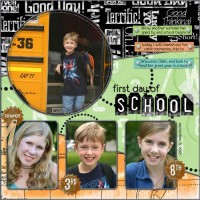 |
For this one, I
added a Wow Chrome Layer Style to the black
template (duplicate layer) before filling the
original template with papers from our Simply
School Days CD. Then just added fun elements and
journaling.
Supplies:
Circle ScrapOver
Twist
Template from
ScrapOver Twist
Pak 1
Geography, Math, and Affirmations Papers,
Scotch Tape, and Journaling Strips from Simply
School Days CD - retired
Scrap.Words - School Days
Journaling Font: Eurofurence Light
|
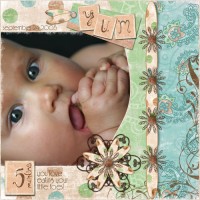 |
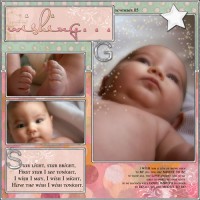
My little niece
loves to nibble on her toes! Used our ScrapOver Twist
Templates (like Stained Glass Patterns) and
filled with the papers from Peaches & Paisley
Pak.
These ScrapOver
Twists also come with a soft, grunge
black overlay (I changed color to white)
Supplies:
Curved ScrapOver
Twist
Template and Grunge Overlay (changed color from
black to white) from
ScrapOver Twist
Pak 1
Peaches & Paisley Page Pak
Journaling Font: Feena Casual
|
|